
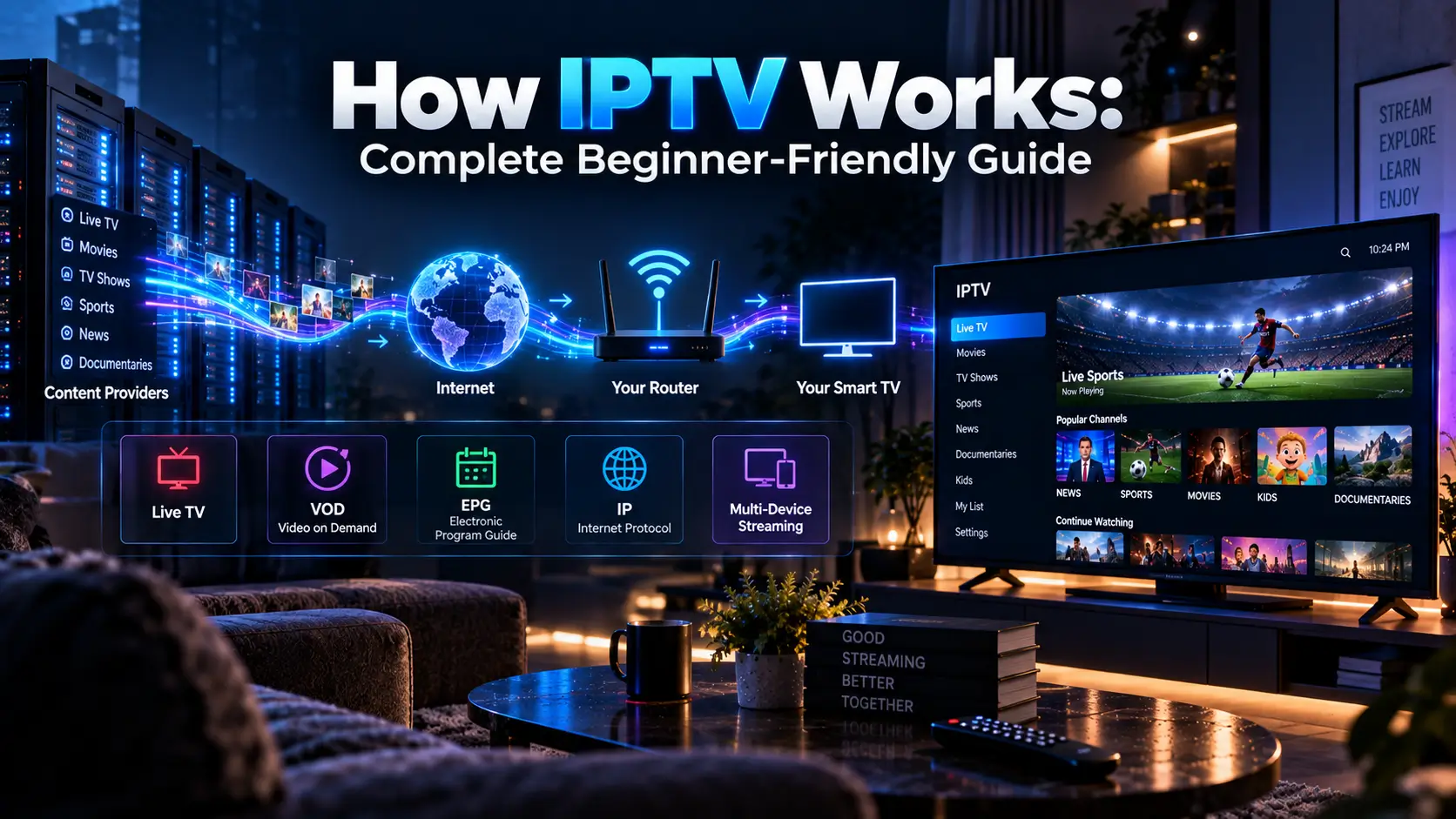
How IPTV Works – Complete Beginner Friendly Guide

How IPTV works is actually easier to understand than it sounds. IPTV delivers television content through an internet connection instead of sending it through a traditional cable line, satellite signal, or terrestrial broadcast. When you select a live channel, movie, or TV show, your IPTV service sends the required video data over the internet to your device, where an IPTV app or player processes it and displays the picture on your screen.
The important part is what happens between clicking a channel and seeing the video. In this beginner-friendly guide, we will explain the complete IPTV process, including servers, video encoding, streaming, data packets, buffering, IPTV players, M3U playlists, EPG, internet speed, device compatibility, and the difference between IPTV and traditional TV.
What Is IPTV?
IPTV stands for Internet Protocol Television. In simple terms, it means television content delivered through an IP-based network, usually the internet. Instead of receiving a television signal directly from a satellite dish, antenna, or cable connection, your device receives video data through your internet connection.
IPTV can include live television channels, sports, news, movies, TV series, video on demand (VOD), and catch-up programming. What you actually receive depends on the service provider and the rights it has to distribute the content.
How IPTV Works in Simple Terms
The easiest way to understand IPTV is to follow the journey of a video from the provider’s system to your TV.
- The TV channel or video enters the provider’s system.
- The content is converted and compressed into a digital streaming format.
- The video is stored or processed on streaming servers.
- Your IPTV app requests the channel or video you selected.
- The server sends the video data through the internet in small pieces.
- Your router passes that data to your streaming device.
- The IPTV player receives and buffers the incoming data.
- Your device decodes the video and displays it on your screen.
That entire process happens continuously while you watch. You normally do not download the entire movie or live channel before playback starts. The player receives enough data to begin playing and continues requesting more while the video runs.
The Complete IPTV Process
1. Content Is Captured or Stored
For a live channel, the provider starts with a live broadcast feed. For movies and TV shows, the content is already recorded and stored. The provider’s system needs access to the video before it can distribute it to viewers.
This is the first major difference between live IPTV and VOD. A live stream is being processed as the program happens, while VOD content can already be stored and prepared before you request it.
2. Video Is Encoded and Compressed
Raw video contains an enormous amount of data. Sending it directly over the internet would require far more bandwidth than most home connections can provide.
Before delivery, the video is therefore encoded and compressed into a format suitable for streaming. Compression reduces the amount of data required while trying to maintain acceptable picture and audio quality.
This is one reason you may see the same channel available in different qualities such as SD, HD, Full HD, or 4K. Higher resolutions generally require more data to be delivered consistently.
3. The Video Is Prepared for Streaming
The prepared video is made available through a streaming system. Depending on the service architecture, the content may be distributed through one or more servers or a wider delivery network.
Large IPTV operations may need substantial infrastructure because many viewers can request the same channel at the same time. This is especially important during major sporting events, when demand can increase rapidly.
4. You Select a Channel or Video
When you open an IPTV app and select a channel, your device needs information that tells the player where and how to request that stream. Depending on the service, this may be provided through an M3U playlist, Xtream Codes credentials, an API-based login, or another supported method.
The IPTV player is therefore not necessarily the company providing the television content. In many setups, the player is simply the software that connects your subscription information to the available streams.
5. Video Data Travels Through the Internet
Once the stream is requested, video data travels from the provider’s infrastructure through networks operated by internet providers and other network operators until it reaches your home connection.
Internet data is transmitted in packets rather than as one giant video file. Your device receives these pieces and processes them in the correct order so continuous playback can take place.
6. Your Router Receives the Stream
Your home router is the connection point between your local network and the internet. It receives the incoming data and sends it to the device running your IPTV application.
That device might be a Smart TV, Fire TV device, Android TV box, Chromecast with Google TV, smartphone, tablet, computer, or dedicated set-top box.
If you are using a Samsung Smart TV, for example, IPTV playback can depend on the available Tizen-compatible player and how well the service works with that setup. Our IPTV for Samsung guide covers that type of setup in more detail.
7. The IPTV Player Buffers the Stream
Your IPTV player normally keeps a small amount of incoming video data ready before and during playback. This is called buffering.
Buffering exists because internet traffic does not always arrive at exactly the same speed. A small buffer gives the player some room to continue playing if the next few packets take slightly longer to arrive.
If data arrives too slowly for too long, the buffer can empty. That is when you may see the familiar spinning circle, freezing, pixelation, or repeated pauses.
8. Your Device Decodes the Video
The final step is decoding. Your TV, phone, computer, or streaming device converts the compressed digital video data into images and audio that your screen and speakers can display and play.
That is why device hardware matters. Two devices connected to the same internet connection can sometimes provide different results if one has better hardware, software support, or a more suitable IPTV player.
What Are the Main Types of IPTV?
Live IPTV
Live IPTV works most like traditional television. You select a channel and watch the program while it is being broadcast.
Live sports, news, live events, and regular television channels are common examples. Live IPTV is also where server capacity and network stability become particularly important because large numbers of viewers may connect to the same event simultaneously.
Video on Demand
VOD lets you select a movie, series, documentary, or other recorded program whenever you want. Instead of joining a live channel, you request a specific piece of content from the provider’s library.
Many IPTV subscriptions combine thousands of live channels with a separate VOD library. However, a large VOD number alone does not tell you how useful or current that library actually is.
Catch-Up and Time-Shifted TV
Catch-up TV lets you watch selected programs after their original broadcast. Some services also offer a start-over feature that allows you to restart a program that is already being broadcast.
IPTV vs Cable vs Satellite vs Streaming Services
| Feature | IPTV | Cable | Satellite | Typical OTT Service |
|---|---|---|---|---|
| Delivery | Internet | Cable network | Satellite signal | Internet |
| Live TV | Common | Common | Common | Depends on service |
| VOD | Common | Sometimes | Sometimes | Common |
| Internet required | Yes | Not normally | Not normally | Yes |
| Multiple device support | Often | Usually requires additional equipment | Usually limited | Usually |
| Dish required | No | No | Yes | No |
The biggest difference is the delivery method. IPTV and OTT services both use the internet, but IPTV commonly emphasizes live television channels while many OTT services are built primarily around on-demand programming.
What Do You Need to Use IPTV?
- A stable internet connection: Your connection needs enough capacity for the quality and number of streams you want to watch.
- A compatible device: This can be a Smart TV, Fire TV device, Android TV box, Chromecast with Google TV, computer, phone, tablet, or dedicated set-top box.
- An IPTV player: The player is the software used to load and play your IPTV streams.
- Provider credentials: Your service may provide an M3U playlist, Xtream Codes login, or another form of access.
- A legitimate service: The provider should have the appropriate rights to distribute the content it offers.
If you use Chromecast, the setup depends on the model. Chromecast with Google TV can run compatible apps directly, while older Chromecast devices typically rely more heavily on casting from another device. Our IPTV for Chromecast guide explains the difference.
How Much Internet Speed Does IPTV Need?
There is no single internet speed that guarantees perfect IPTV because stream quality, compression, network congestion, Wi-Fi performance, server capacity, and the number of simultaneous users all matter.
| Streaming Quality | Practical Starting Point |
|---|---|
| SD | About 5 Mbps per stream |
| HD | About 10–15 Mbps per stream |
| Full HD | About 20–25 Mbps per stream |
| 4K | 40 Mbps or more per stream |
These figures should be treated as practical starting points rather than guarantees. If two people are streaming at the same time, the household needs more available bandwidth. Wi-Fi interference, other downloads, cloud backups, gaming, and other connected devices can also reduce the bandwidth available to IPTV.
Why Does IPTV Buffer?
Buffering does not automatically mean your internet connection is bad. IPTV playback depends on several points in the chain, and a problem at any one of them can affect playback.
- Your internet connection may be too slow for the selected quality.
- Wi-Fi interference may reduce real-world performance.
- Your ISP connection may be congested.
- The provider’s server may be overloaded.
- The stream itself may have an unstable source.
- The IPTV application may have software or compatibility problems.
- Your streaming device may struggle with a particular video format.
- A popular live event may create a sudden traffic spike.
This is why we do not recommend judging an IPTV service purely by its advertised channel count. In our football IPTV testing, for example, we specifically look at performance around real kickoffs because peak demand can expose problems that are invisible during quiet periods.
What Is an M3U Playlist?
An M3U playlist is essentially a text-based list containing information that an IPTV player can use to locate streams. It does not normally contain the actual video files. Instead, it points the player toward the relevant stream locations and can contain channel information.
When a provider gives you an M3U URL, you normally paste that URL into a compatible IPTV application. The app then imports the available channels and other playlist information.
What Are Xtream Codes?
Xtream Codes is another common way IPTV services provide account access to compatible players. Instead of manually loading a traditional playlist URL, the player may ask for a server address, username, and password.
The exact fields and login method depend on the provider and the IPTV player. The important point for beginners is that M3U and Xtream Codes are access methods. They are not IPTV services by themselves.
What Is an EPG in IPTV?
EPG stands for Electronic Program Guide. It works like the channel guide on a traditional cable or satellite receiver by showing current and upcoming programs.
A provider may supply EPG data together with the playlist, or the player may require a separate EPG source. A useful EPG makes a large IPTV channel list much easier to navigate because you can see what is currently playing and what is scheduled next.
Does IPTV Work on Smart TVs?
Yes, IPTV can work on many Smart TVs, but the exact setup depends on the TV operating system, available apps, provider format, and region.
Samsung TVs use Tizen, for example, so the available IPTV applications are not necessarily the same as those on Android TV or Google TV. If the required app is unavailable, an external streaming device can sometimes provide another option.
Before buying a subscription, check whether the service works with the device you actually own. Our Samsung IPTV guide is useful if Samsung is your main viewing device.
Is IPTV Legal?
IPTV technology itself is legal. The legal question is about the content being distributed and whether the provider has the necessary rights or licenses.
Legitimate television companies, broadcasters, and streaming platforms can all use internet-based television delivery. The problem arises when a service distributes copyrighted channels, movies, sports, or other programming without the required authorization.
Because broadcasting rights and laws vary between countries, check the provider’s licensing information and the rules that apply in your location before subscribing.
How to Tell If an IPTV Provider Is Worth Considering
If you are researching IPTV providers, do not make your decision based only on a headline such as “50,000 channels” or “4K streaming.” Those numbers tell you very little about whether the service will actually work well for you.
- Channel availability: Does it actually carry the channels and regions you watch?
- Streaming stability: Does playback remain stable during busy periods?
- VOD quality: Is the movie and series library useful, organized, and updated?
- EPG: Does the program guide load correctly and match the channels?
- Device compatibility: Does it work with your TV, Firestick, Android TV, Chromecast, or other device?
- Connections: Does the plan support the number of simultaneous streams your household needs?
- Pricing: Is the cost clear, and are renewal terms understandable?
- Support: Can you actually contact the provider when setup or account problems occur?
- Trial or refund policy: Can you test the service before committing to a long subscription?
- Licensing: Is there clear information about the provider’s rights to distribute its content?
These are also the types of factors we use when comparing services across our tested IPTV provider comparisons.
Does IPTV Work Differently in Different Countries?
The underlying technology is broadly the same, but the viewing experience can vary significantly by country. Channel rights, local broadcasters, sports coverage, server locations, internet infrastructure, and regional demand can all affect which service makes sense for a particular viewer.
For example, someone looking for Canadian channels may care about a different lineup than someone watching from the UK. That is why we maintain country-specific research rather than assuming one IPTV package is equally useful everywhere.
For regional research, see our IPTV Canada guide, IPTV UK guide, IPTV Australia guide, and IPTV France guide.
What Happens When You Change Channels?
Changing an IPTV channel is not exactly the same as changing channels on a traditional cable box. Your player generally stops requesting one stream and begins requesting another.
The new stream has to connect, begin delivering data, build enough buffer for playback, and then be decoded by your device. That is why a short delay of a few seconds when changing channels is not necessarily a sign that something is wrong.
Why Live Sports Are a Good Test for IPTV
Live sports are one of the toughest real-world tests for an IPTV service. A normal entertainment channel may have relatively stable demand, but a major football match can cause a large number of viewers to connect at almost the same time.
That is why a service that works perfectly during an afternoon test may behave differently during a major match. If sports are important to you, test the service during the type of event you actually plan to watch.
Common IPTV Problems and What They Usually Mean
| Problem | Possible Cause |
|---|---|
| Constant buffering | Weak connection, Wi-Fi problems, overloaded server, or unstable stream |
| One channel does not work | Source problem or unavailable channel feed |
| EPG is empty | Incorrect or missing guide data |
| Channels load slowly | Large playlist, server response, or app performance |
| 4K keeps freezing | Insufficient bandwidth, device limits, or unstable source |
| Login fails | Incorrect credentials, expired account, or provider-side issue |
| App crashes | Compatibility, outdated software, or device limitations |
Final Takeaway: How IPTV Works
So, how IPTV works can be reduced to a simple chain: a provider obtains or stores television content, prepares and encodes the video, makes the stream available through its infrastructure, and sends the requested data across the internet. Your router delivers that data to your device, while the IPTV player buffers and decodes it so you can watch the content on your screen.
The part beginners often miss is that IPTV performance is not controlled by one thing. Your internet connection, Wi-Fi network, streaming device, IPTV player, provider server, stream source, video quality, and network congestion can all affect the final result.
That is also why comparing IPTV providers should involve more than looking at channel numbers. If you are ready to compare services, start with our tested IPTV provider guide and then narrow your choice according to your country, device, content needs, and viewing habits.
FAQ’s
IPTV works by delivering television video through an IP network. The provider prepares and encodes the content, a server delivers the requested stream, and your IPTV player receives, buffers, decodes, and displays the video.
You need enough stable bandwidth for the quality you are watching. HD generally needs less bandwidth than 4K, and multiple simultaneous streams require more capacity.
Yes. IPTV can work on many Smart TVs when a compatible IPTV player is available. The exact setup depends on the TV operating system, app availability, provider format, and region.
Both use the internet to deliver video, but they are not the same type of service. IPTV commonly includes live television channels alongside VOD, while Netflix is primarily an on-demand streaming platform.
An M3U playlist is a text-based list containing stream information that a compatible IPTV player can use to load channels. It normally points to streams rather than containing the actual video itself.
IPTV technology is legal. The important question is whether a provider has the required rights to distribute the content it offers. Check licensing information and applicable local laws before subscribing.
A fast internet connection does not guarantee smooth IPTV. Buffering can also come from overloaded provider servers, an unstable stream source, Wi-Fi problems, network congestion, application issues, or device limitations.
EPG means Electronic Program Guide. It displays current and upcoming programs for the channels in your IPTV service, similar to the TV guide on a traditional cable or satellite receiver.
One Comment